A new massage chair can look like a cockpit: dozens of buttons, programs with vague names, and a body scan that starts before you're ready. Most first sessions go wrong in the same few ways. The chair is too strong, too long, or the rollers land in the wrong place. This guide walks you from plugging it in to getting up afterward, using the instructions in real owner's manuals. If you're still choosing, these chairs are among the easiest to start with:
Massage Chairs That Are Easy to Use From Day One

Why it's #1: it removes the two hardest parts of a first session. It arrives fully assembled, and AI voice control means you don't have to learn the remote straight away. A body scan sets the rollers to your shape, and owners mention easy setup 44 times.

Why it's #2: voice control plus an LED touchscreen, and you can lock the rollers onto one spot once you know where you're tight. It arrives in one box with no assembly. Some owners still find the controls take getting used to, and it has fewer ratings (67).
Before the First Session: Placement and Power
- Leave room to recline. The Genki M380 manual, for example, asks for 2 inches behind the backrest and 14 inches in front for the footrest to extend. Check your own model's figures; our massage chair dimensions guide lists several.
- Use a grounded outlet, with no adapter. Genki's manual specifies a grounded 120-V outlet and says no adapter should be used.
- Keep it away from water and electronics. Osaki warns against humid rooms like bathrooms, and Genki suggests keeping the chair 3 feet from a TV or radio to avoid interference.
- Find the main power switch. Many chairs, including the Genki, have a switch on the back of the base that must be on before the remote works.
Your First Session, Step by Step
- Check behind and under the chair for children and pets before you recline. Genki's manual warns the backrest reclines with force, and anything under the leg rest can be crushed when it lowers.
- Sit all the way back and adjust the neck pillow so it rests in the arch of your neck. On the Genki, it moves on Velcro.
- Choose a gentle auto program for your first session rather than a "deep tissue" or "sports" mode.
- Stay still during the body scan. Genki says to remain seated back without lifting your head while the chair maps your back, shoulders and neck.
- Fine-tune the shoulder position when prompted, moving the rollers up or down until they land on your shoulders, not your neck.
- Set the timer short. Genki offers 10, 20 or 30 minutes, with 20 as the default. Start with 10 to 15 minutes.
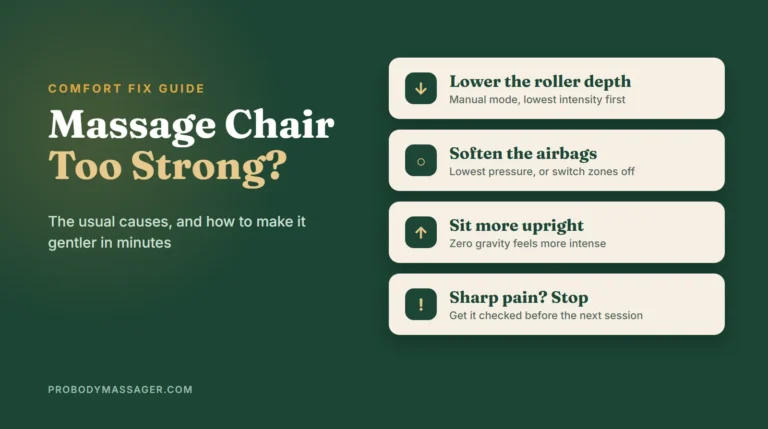
- Lower anything that feels too strong: roller intensity first, then airbag pressure, then foot rollers.
- Get up safely. On many chairs, pressing the power button returns the chair upright. Check under the leg rest again before it lowers.
What the Main Controls Do
| Control | What it does | First-week tip |
|---|---|---|
| Auto programs | Preset routines that combine techniques, airbags and recline | Start with relax or gentle modes |
| Manual mode | Pick a technique (kneading, tapping, shiatsu) and an area yourself | Use it once you know where you're tight |
| Intensity / 3D depth | How hard or far forward the rollers press | Keep it at the lowest levels at first |
| Airbags | Squeeze the shoulders, arms, hips, calves and feet | Set to the lowest pressure; switch off zones you don't like |
| Foot rollers | Roll the soles of your feet | Wear socks, or turn them off if they're too firm |
| Heat | Warms the back, waist or calves | Avoid if you can't feel heat well |
| Zero gravity | Reclines to raise your legs | More intense than upright; try it after a few sessions |
| Timer | Sets session length | 10 to 15 minutes to start |
| Sleep mode (some chairs) | Leaves the chair reclined after a program ends | Switch it off if you want the chair to return upright |
Labels vary by brand, so keep the manual handy for the first week. If the massage still feels too strong after lowering everything, see our guide to why a massage chair hurts and how to make it gentler.
The First Week: What's Normal
- Mild soreness can happen. The Osaki Monarch LE manual says you may feel mild soreness in the first few days. It advises seeing a doctor before using the chair again if the soreness doesn't ease.
- Timing matters. Genki advises against using the chair right after a meal, and Osaki says not to use it after drinking alcohol.
- Don't fall asleep in it. Genki warns against falling asleep while it runs, to avoid overheating, injury or discomfort from overuse.
- Build up gradually. Osaki's limit is 30 minutes per session and 5 minutes on any one area. More on session length in our guide on how long to use a massage chair.
Genki's manual says the chair should not be used by children under 14, and that the areas under the footrest and behind the backrest are dangerous for small children and pets. Unplug the chair after use so children can't switch it on. Many manuals carry similar warnings.
After Each Session
- Return the chair upright, checking under the leg rest first.
- Unplug it. Genki says to unplug it immediately after use and during thunderstorms.
- Wipe the surfaces with a soft, dry cloth, and keep the plug free of dust and moisture as Osaki advises.
- Cover it for long breaks. Genki recommends covering the chair and coiling the cord when it won't be used for a while. See our massage chair covers guide.
The Easy-Start Chairs, Up Close
Each of these chairs makes the first session easier in its own way: no assembly, voice control or a familiar touchscreen. Here's what each one does and what owners report.
KoziSense A18: Nothing to Assemble, Nothing to Memorize
KoziSense A18 Zero Gravity Full Body Massage Chair with Heat

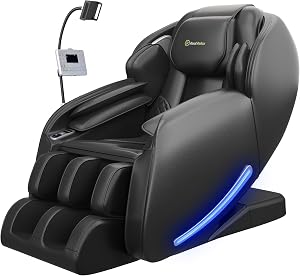
The A18 takes the two hardest parts out of a first session. It arrives fully assembled on wheels, so there's nothing to build, and AI voice control lets you start a program before you've learned the remote (you can switch voice off). A body scan then sets the rollers to your back before the massage begins.
Once you're comfortable, it has 12 auto modes and 8 manual modes, 3 zero gravity positions and a 3-stage foot massage. Owners mention easy setup 44 times, and comfort leads its reviews. KoziSense covers it for 3 years, with free repair in year 1. See our full A18 review.
Key Features
- Arrives assembled: rolls into place on wheels, no tools.
- AI voice control: start programs by voice; switch it off anytime.
- Body scan: maps your back before the rollers start.
- 12 auto + 8 manual modes: presets first, manual control later.
- 3-year warranty: free repair in year 1, US-based support.
What Buyers Say
Owners lead with comfort and say it was easy to set up and start using. Heat and sizing draw mixed comments, with the best fit reported at the shorter end of its range.
Pros
- Zero assembly
- Voice control from day one
- Body scan sets the rollers
- 3-year warranty
Cons
- 250 lb limit
- Mild heat
- Sizing reviews are mixed
Best for First-time owners who want to sit down and press start.
Skip if You're over 250 lb or taller than about 6'2".
FURNIMAT 3D: Voice, Touchscreen and a Spot Lock
FURNIMAT 3D Full Body Massage Chair, Zero Gravity SL-Track

The FURNIMAT 3D gives you two ways in: say a command, or tap the LED touchscreen. Start with one of its 11 programs, and once you know where you're tight, lock the rollers onto one spot or one zone. A body scan sets the 3D rollers on its 55-inch SL track to your height first.
It arrives in one box with no assembly, adds 3 zero gravity positions and twin foot rollers at 3 intensity levels, and lists a 3-year warranty. Some owners still find the controls take getting used to, and with 67 ratings its track record is thin. Our FURNIMAT review compares it with the brand's 2026 model.
Key Features
- Voice + LED touchscreen: two ways to start a session.
- 11 programs, 6 techniques: presets for the first week.
- Spot or zone lock: hold the rollers where you're tight.
- Body scan + 55-inch SL track: sets the rollers to your height.
- One box, no assembly: 3-year warranty listed.
What Buyers Say
Owners say it meets expectations for home use and praise its back and neck support in zero gravity. The controls are the mixed point: some find them hard to learn, and one owner says the rollers feel like wood.
Pros
- Voice and touchscreen control
- Spot or zone lock
- No assembly
- 3-year warranty
Cons
- Controls take learning
- Only 67 ratings
- Third-party sellers, no brand website
Best for Owners who want simple starts now and finer control later.
Skip if You want lots of owner reviews before you buy.
Real Relax 2026 3D: A Controller That Feels Like a Phone
Real Relax 2026 3D Massage Chair Full Body with Phone Controller

Real Relax swaps the usual wired remote for a Bluetooth phone-style controller that sits in a holder, so picking a program feels like using an app. Owners say setup takes about 15 minutes. Behind the controller is a full 3D SL track with adjustable roller width and intensity, fixed-point and zone modes, airbags, foot rollers and lower-back heat.
It has the biggest owner base of the three, 1,184 ratings at 4.3 stars, with comfort mentioned 476 times. A child lock keeps settings from changing by accident. The trade-offs: a 1-year parts warranty, 8% one-star ratings, and some owners over 250 lb find the seat narrow.
Key Features
- Phone-style controller: Bluetooth, with a holder on the chair.
- 3D SL track: adjustable width and 3 intensities.
- Fixed-point and zone modes: aim at one area once you know it.
- Airbags, foot rollers, lower-back heat: full-body coverage.
- Child lock: stops accidental changes mid-session.
What Buyers Say
Owners call it comfortable and worth the money and say assembly is quick. Width is the main complaint from larger users.
Pros
- Most owner data here: 1,184 ratings
- Familiar phone-style controls
- About 15-minute setup
- Child lock
Cons
- 1-year parts warranty
- Narrow for some over 250 lb
- 8% one-star ratings
Best for Buyers who trust a big review base over warranty length.
Skip if You want multi-year coverage.
How to Use a Massage Chair FAQ
How do you use a massage chair for the first time?
Check behind and under the chair for children or pets, sit fully back, adjust the neck pillow, choose a gentle auto program, stay still during the body scan, set a 10 to 15 minute timer, and lower the intensity if anything feels too strong.
How long should my first massage chair session be?
Start with 10 to 15 minutes. Manuals set upper limits, such as 20 minutes (Genki's default timer) or 30 minutes (Osaki's maximum).
Is it normal to feel sore after using a massage chair?
Mild soreness in the first few days can happen, according to Osaki's manual. If it doesn't ease, stop and check with a doctor, and use lower settings next time.
Should I unplug my massage chair after each use?
Genki's manual says to unplug it immediately after use, before cleaning and during thunderstorms, and to keep children from switching it on.
Can I use a massage chair right after eating?
Genki advises against it, as it may cause discomfort. Wait a while after a meal.
Can children use a massage chair?
Genki says its chair shouldn't be used by children under 14, and warns that children and pets can be hurt by the reclining backrest and lowering leg rest. Check your model's manual.
Affiliate Disclosure: ProBodyMassager.com may earn a commission from qualifying purchases made through links on this page, at no extra cost to you. It never changes which products we recommend.